
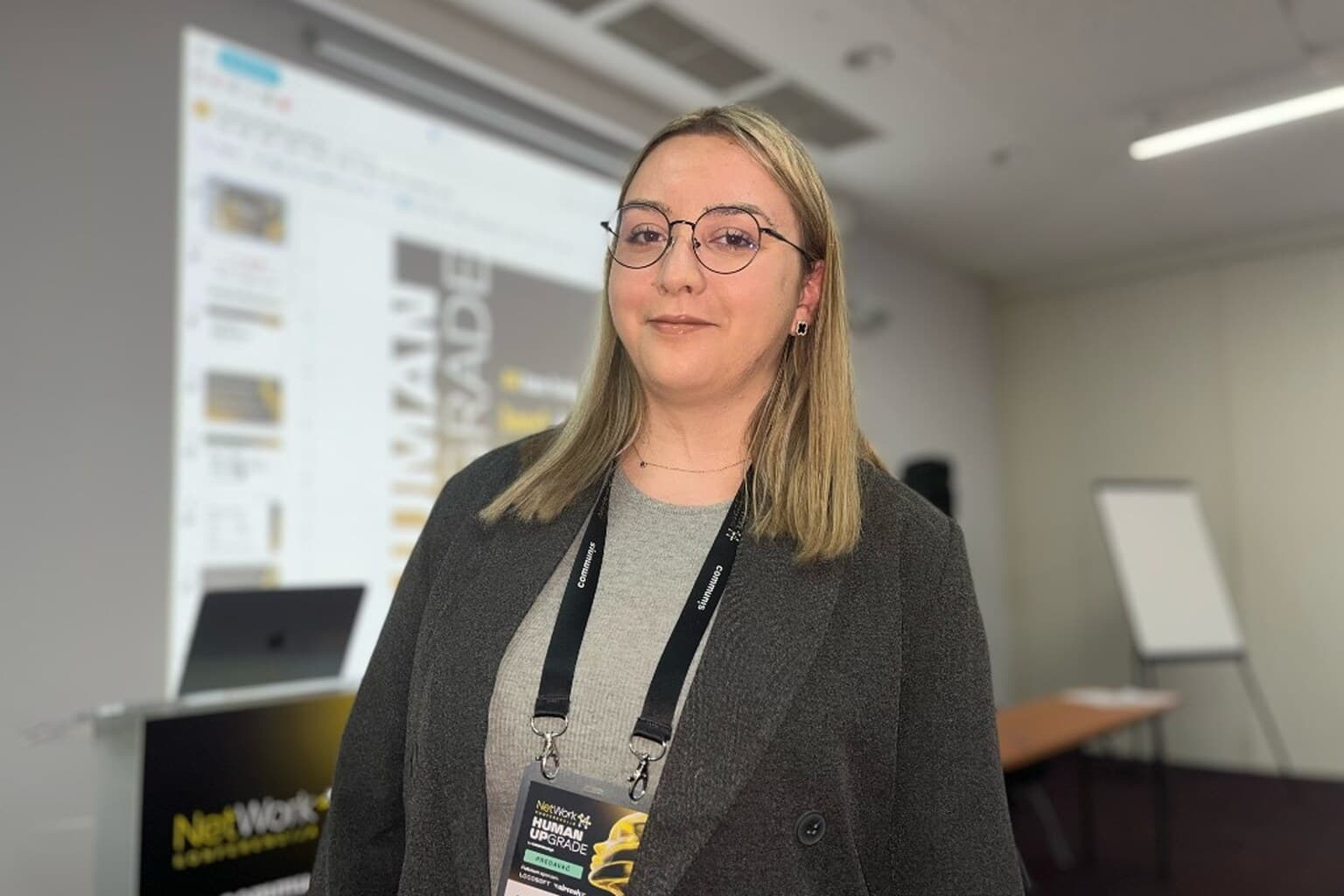
Nejra Coric directs CodeLoop Studio in Sarajevo. This is her account of the talk she gave at NetWork 14 in Neum, 21–23 October 2026: “AI as your lead developer,” from idea to production while keeping control of every decision. The Bosnian version is the pair to this page.
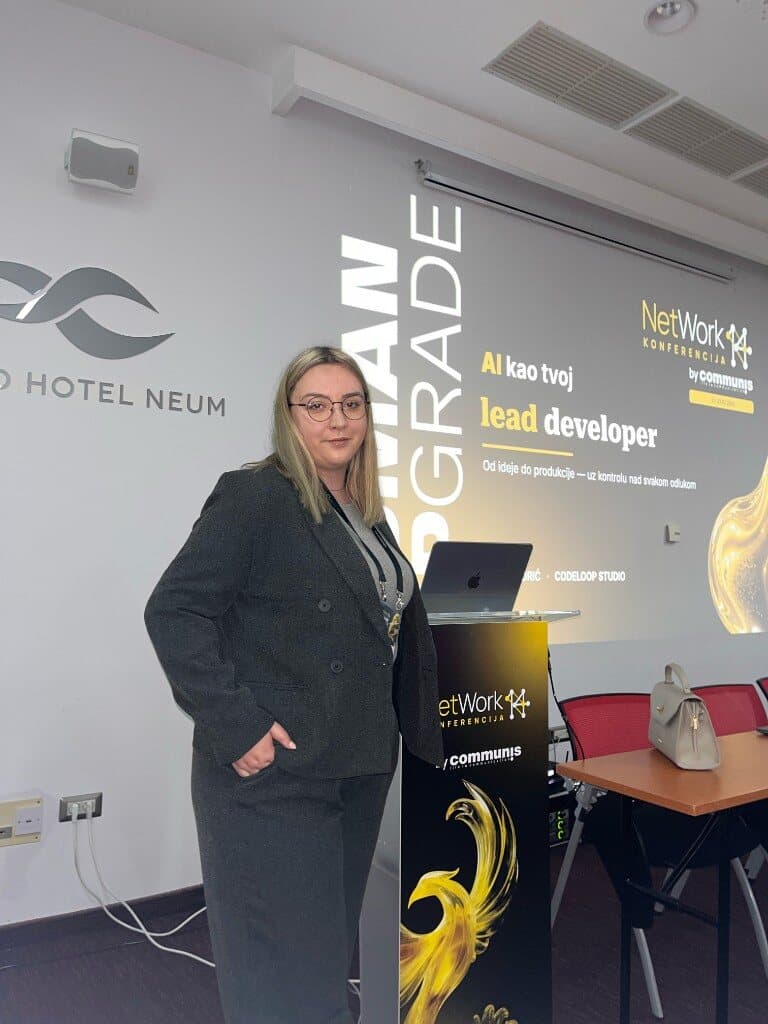
What a lead developer still owns
I opened on one question. Can AI be a lead developer? Writing a function, finding a bug, or drafting a few tests is no longer the surprising part. The useful question is how much of the software lifecycle I can speed up without losing the thing I have to ship.
Code is one slice of that lifecycle. Before it, someone has to understand the request, make a plan, and take the architecture decisions. After it, someone has to test, look for failures, check security, document, and keep the product running. I use AI across that span, from a bare idea through features, design, implementation, debugging, tests, and documentation. A model can produce in minutes something that used to take hours. It can also produce a security problem that takes longer to undo. Faster typing is the smaller saving. The larger one is understanding a problem sooner, comparing options, or catching something I would have missed.
I introduced the work the way the studio is actually set up. I am a software developer and the founder of CodeLoop, a software studio in Sarajevo. Mobile came first for me, Android and iOS, and we also ship web applications and custom software. I hold two views at once. As a developer I care whether the architecture holds and whether the product really works. As the owner I care about deadlines, budget, and how a small team answers a large request while quality and security stay intact. AI changed how I work inside that tension. It did not remove either side of it.
I started, as most developers do, by treating the model as a sharper search box. I had a problem, I pasted some code, I got an explanation, I kept going. It stopped being the tool I open only when I am stuck. The process on the slides is still mine. I was not offering a recipe I claim will fit every team and every project.
A short prompt invents a conference
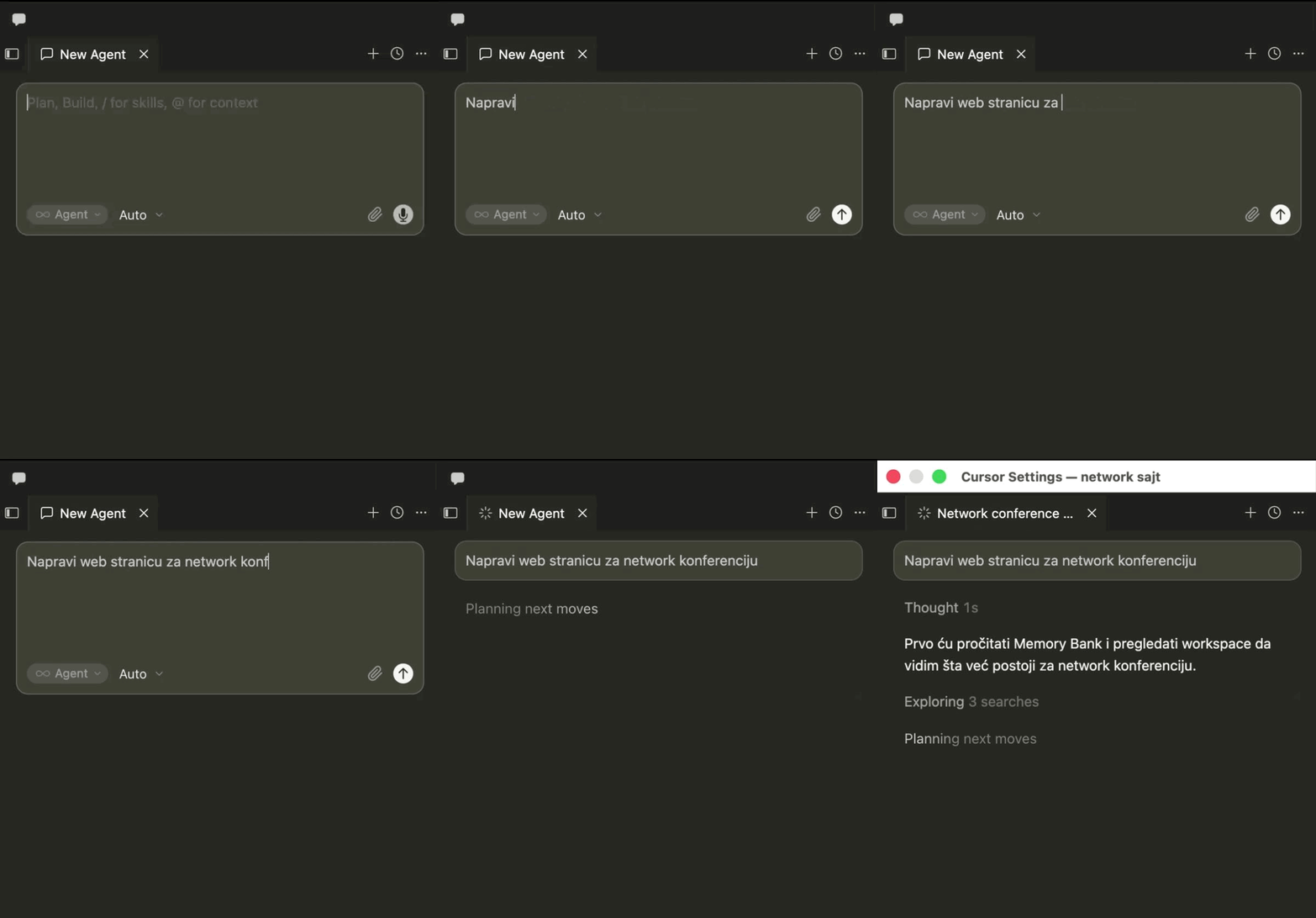
I used the conference in front of me as the example. Same task, a website for NetWork. Same tool, Cursor. Two instructions.
The short one was only “make a website for the Network conference.” I had not named the sections, the audience, the visual identity, or the stack. The model filled the gaps. The first screen looked complete: a large NETWORK title and the line “Where connections become opportunities.” That is generic networking. NetWork is an IT conference. Along with that copy it invented speakers and ticket prices, and it chose plain HTML. The page looked finished. A finished look is not the same thing as a true result. I had not supplied those facts, so the model supplied its own.
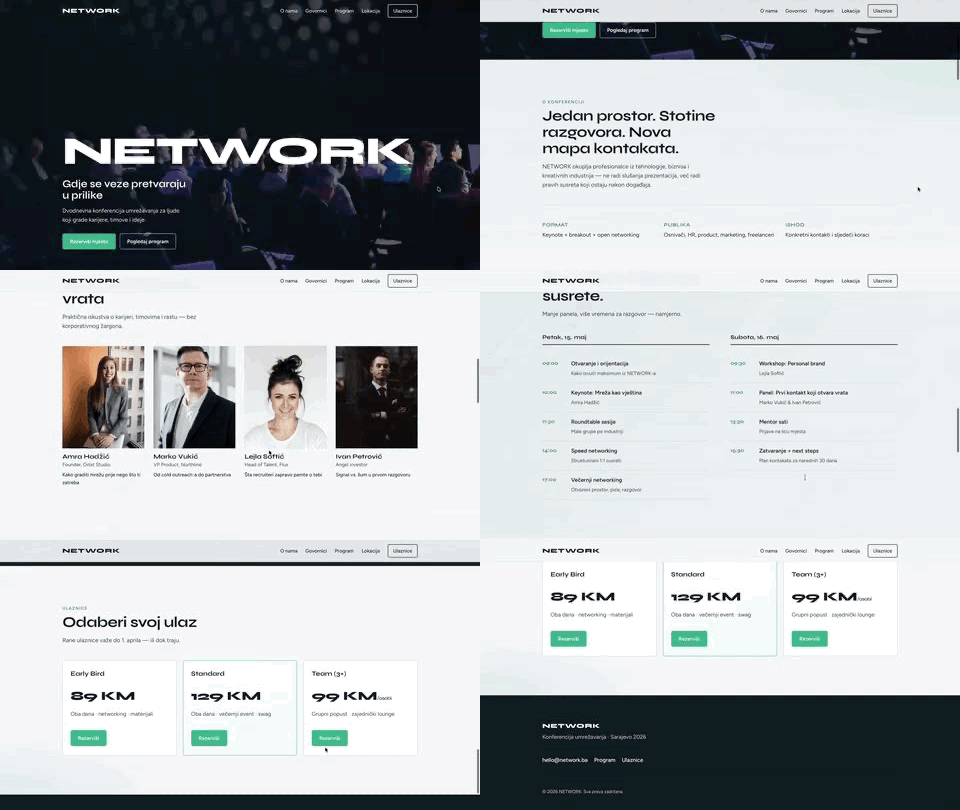
The tighter instruction named the kind of conference, who it was for, which sections I wanted, the palette, and Next.js. The first screen already knew the event: “IT conference on the Adriatic,” Neum, 21–23 October 2026. That result was closer to what I had in mind, and it was still not done. I reviewed the content, the data, and the behavior, then ran another pass. The loop I named there is prompt, generate, review, refine. The model gets you to a version you can judge. The judgment stays with you.
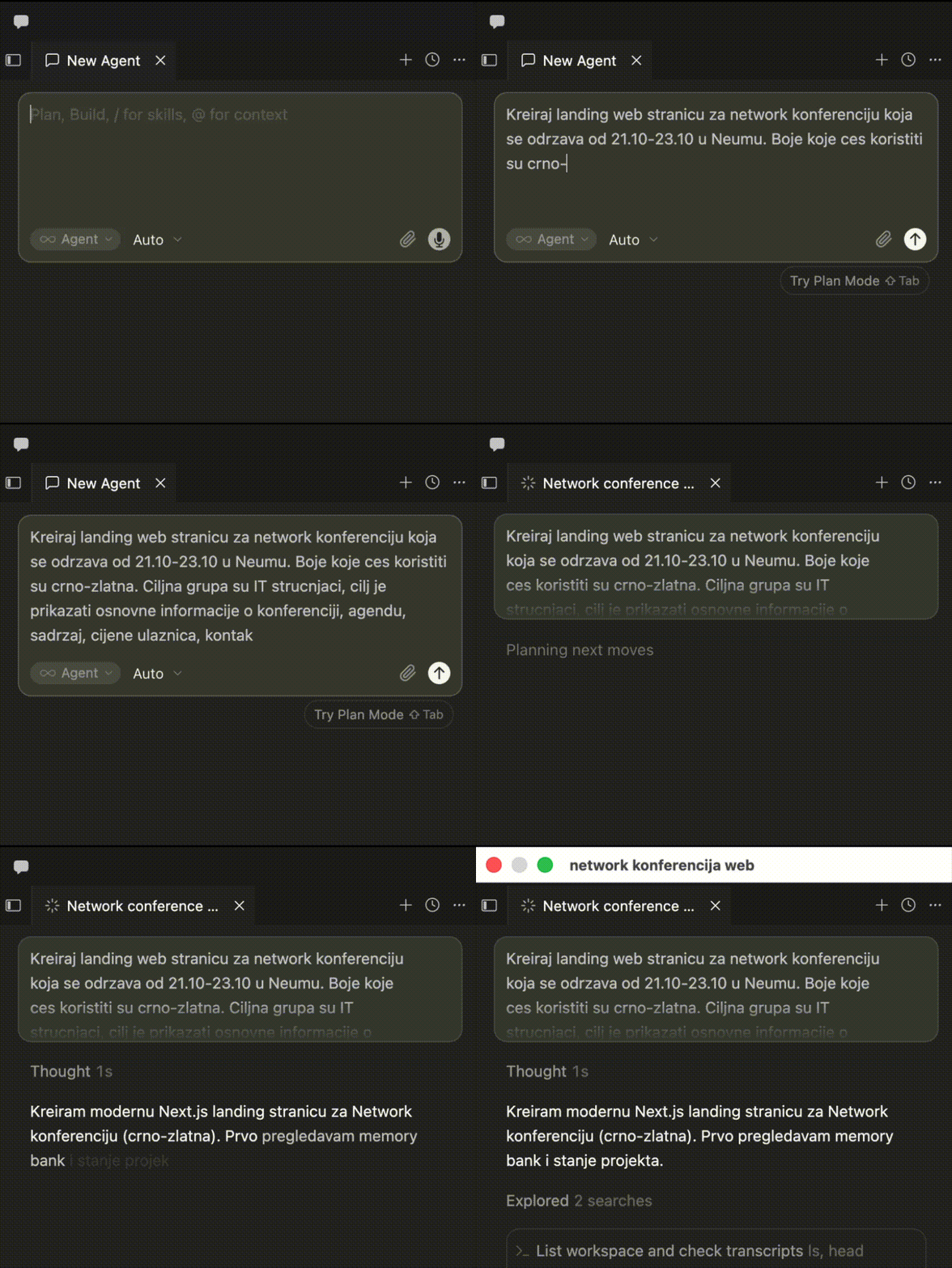
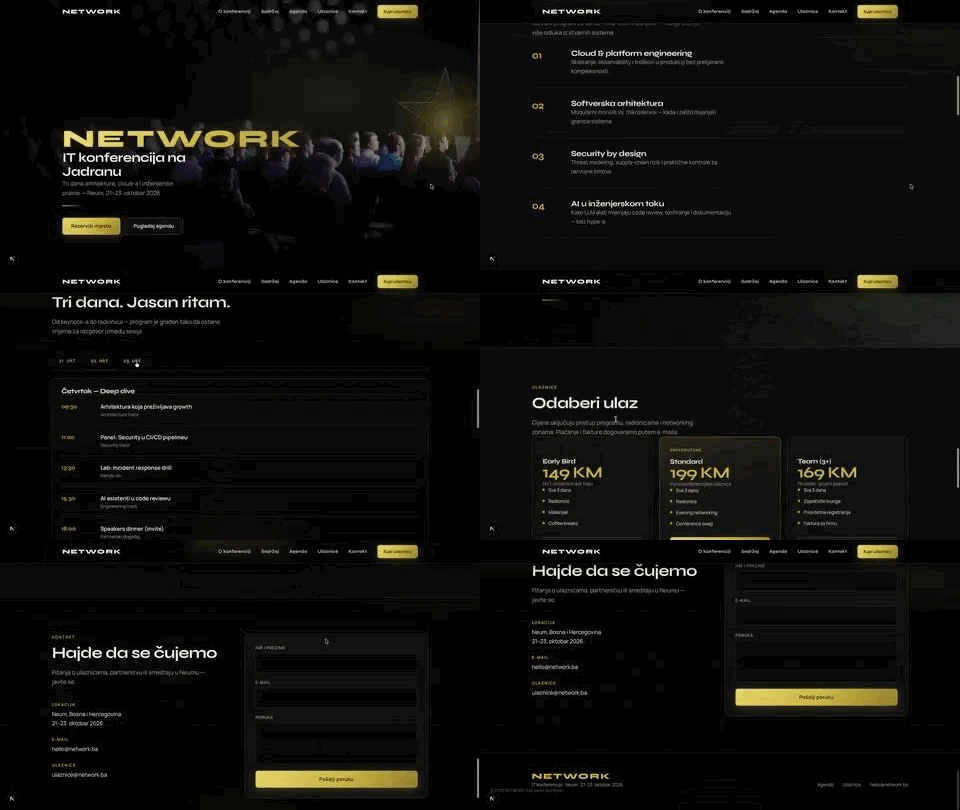
That is where a prompt decides how much time you will spend. The short instruction takes a minute. The bill arrives later, when the first screen looks finished and describes a different event. The message, the structure, the data, and the stack are assumptions. Each assumption becomes refactoring: deleting invented speakers, correcting the headline, replacing the stack, aligning the page with the real conference. That time looks like ordinary work on the code. By then you no longer see it as the cost of a vague prompt, so the generation feels fast.
The minutes you spend up front on context and requirements come back as work you do not have to do. The model still needs a review. With a clear requirement, the edits move toward the event you named. With a short one, you first tear down the conference the model assumed. A good prompt, as I use the word, is a clearer requirement. It does not have to be a longer one. The clearer the goal, the context, and the limits, the less time and effort you spend later undoing assumptions that looked convincing.
My point was who makes the decision. Next.js is not automatically the better stack.
There is also no single workflow that fits every start. I pick the tool for the problem.
- An idea, and nothing drawn yet. I use ChatGPT to pressure the product, a tool such as Google Stitch for a first screen, Figma to set the visual system, and only then Cursor.
- A client who already has a Figma file. I read the screens, components, states, and flows. A handsome frame is not a specification. I still have to know what happens when a button is pressed, the API fails, or a field is empty.
- A reference site, and the sentence “something like this.” I study the structure and the interactions, then build something that belongs to that client. The aim is to see what they actually like, not to copy the page.
In all three, I do not let the model write code until it has something to understand: what already exists, and what this task is actually for.
An idea is not a requirement
“I want an app for my business” is a sentence, not a product. Behind it are users, business rules, limits, and decisions someone has to make. If those decisions wait until after the files exist, they get more expensive. It is tempting to open Cursor, describe the wish, and watch screens appear. The question I keep is whether we built what was needed, or what the model assumed we wanted.
On a small team, the old path still matters. A client conversation, a list of questions, scenarios, a specification, another round of clarification. That work exists so you do not build the wrong product. AI does not delete it. I use it to arrive at a draft I can review, instead of starting from a blank page. The instruction I give is simple: ask me the questions we have to answer before implementation. The model can propose topics, flag a vague requirement, and sketch a first specification. It cannot confirm what the client actually decided. I still do that. The line on my slide is that AI is a conversation partner, not the product director.
Take one ordinary request. “I need an app for booking appointments.” A model will happily draw a calendar and a confirm button. I stop and answer six questions before anyone writes that screen. Each one changes the code.
- Can a booking be cancelled? If yes, how late, and what happens to a payment? Does the slot return to the calendar immediately? One small feature pulls in business rules, the database, notifications, and possibly a payment integration.
- Can two people book the same slot? If both phones show 2 p.m. as free and both tap confirm, a check that only lives on the screen will confirm both. The rule has to be enforced on the backend, with a transaction and a constraint in the database. A business question just became an architecture decision.
- Does the person need an account? Booking without one is faster. A history, a reschedule, or a reminder needs a user, a session, recovery, and protection of that person’s data. One answer changes the size of the project.
- What does an administrator see? Staff, hours, cancellations, maybe reports. Can one employee see only their own schedule? If there are several locations, who sees which? Hiding a button is not authorization. The same rule has to be checked on the server.
- What if the provider cancels? Ten people already booked. Who is notified, who is offered a new time, and who decides? That is a business process, not a single screen.
- What if the request is late? The person taps reserve, nothing happens, they tap again. Did the server save the first booking and the phone never hear back? You need a defined way to handle a repeated request so one action does not become two bookings.
A working demo can hide every one of those assumptions behind an interface that looks finished. A functional demo is not a product that is ready.
Write the spec, and forbid extra features
Once those answers exist, I still do not paste them into Cursor and say “build the app.” I turn them into something I can check. The instruction I use is: from what we agreed, write the requirements, the user stories, the acceptance criteria, and the edge cases. Do not add features we did not agree.
That last sentence matters. Ask for a booking app and a helpful model will also propose a loyalty program, a points system, a chat between the customer and the staff, and a recommendation feature. Interesting, and out of scope. Scope you did not agree is extra work, not a gift.
- Requirements say what the system must do. A person can book a free slot. An administrator can manage availability.
- User stories say who it is for and why. “As a customer, I want to see free times so I can pick one that fits.” That is a purpose, not a button.
- Acceptance criteria say how you will know it is done. When a free slot is booked, the system saves it and shows a confirmation. If the slot was taken in the meantime, the system must not confirm a second booking for the same resource and time. That sentence can be implemented and tested. “Make booking” cannot.
- Edge cases are the paths a demo skips. No network. The same request sent twice. An administrator changes the schedule while someone is booking. An outside service is down.
A developer, a person testing, and the client can then be looking at the same document. I do not skip the specification because a model can draft it. I use the model so the specification is faster to draft and easier to keep current. Someone who owns the product still has to confirm that the document matches the agreement.
Options, then a decision
Almost every serious product can be built more than one way. The mistake I see is picking the stack you already know, or asking a model “which architecture should I use?” and accepting the confident answer. I ask for options and the cost of each. The shape on my slide is problem, options, tradeoffs, decision. Flexibility often means a more complex system. A faster first version often means limits you will meet later. Easier scaling often means more time and money in infrastructure.
For a booking app I walk three shapes, and I expect the reader to throw two of them away.
- One salon, a few staff, modest traffic. One app, one backend, one database, clear modules. Faster to a first version, easier to test, and honest about what happens if the product later grows a lot.
- Several locations, stricter rules, more roles, integrations ahead. A more modular split of the business logic. You buy flexibility and you pay in complexity.
- A platform for thousands of providers and separate business domains. Separate services might earn their keep. They also bring communication between services, distributed failures, more infrastructure, monitoring, deployment, and a harder test suite. If a few hundred people will use the first version, ten microservices is an architecture for a problem you do not have yet.
The prompt I use names the real constraints: the requirements, the expected number of users, the budget, what the team already knows, and how the product is supposed to grow. Then: propose three approaches. For each, the advantages, the disadvantages, the security risks, the cost of keeping it running, and the point at which it stops making sense. That is more useful than “what is the best architecture?” A model can explain a bad architecture with the same confidence as a good one. I treat the answer as material for a decision. I still check the assumptions, the security, the cost, and sometimes a small proof before I commit. AI speeds up the survey of options. It does not cancel the consequences of a wrong choice. When the system is in production, the team owns the architecture. The model does not.
I put it as a rule I can repeat. AI proposes. The developer decides. A few years ago, trying a heavier architecture meant days of setup before you could see it. A model can now draft that setup quickly. The complexity did not disappear. You arrive at it sooner. Technically impressive is not the same as right for this project. The same technology can be a good fit for one product and a poor fit for another, and the model cannot judge that without the real constraints.
Keep the private key off the phone
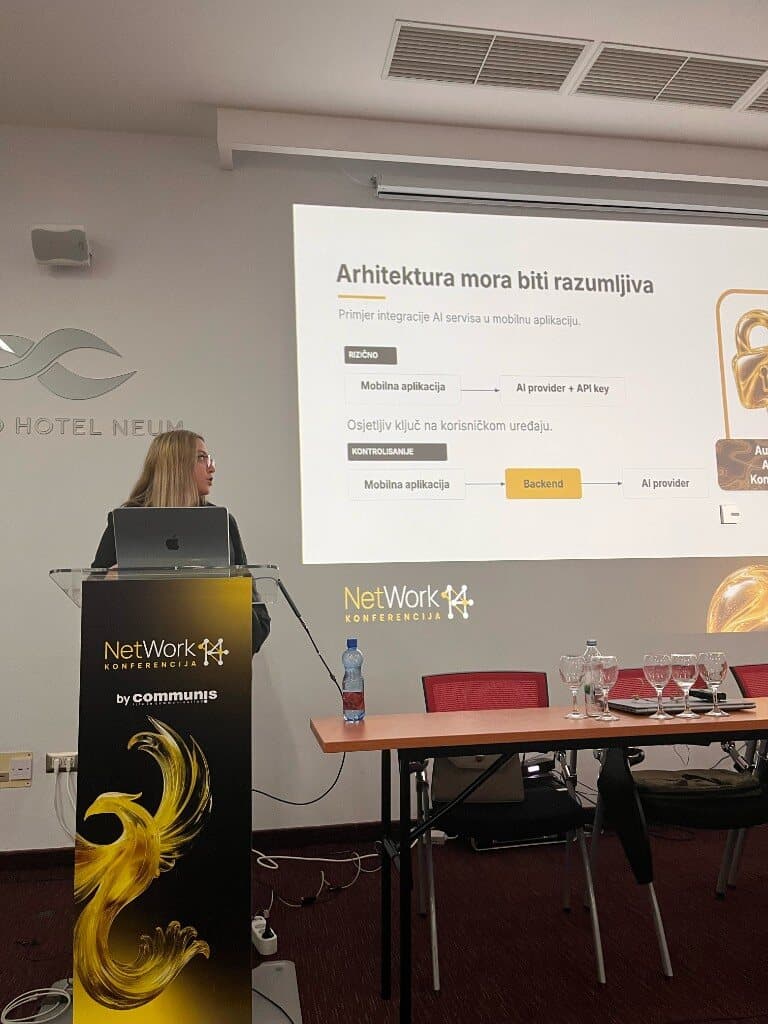
The slide I titled “The architecture has to be understandable” used a mobile app that calls an AI service. Documents, text, an image, a recommendation: the shape is the same. The app sends a request and gets an answer, usually through an API. The shortest path is the one I marked as risky. The phone talks straight to the provider, and the private API key sits inside the app, on a device a person downloads.
During a demo that path looks finished. The button works. The answer comes back. A shipped app can still be unpacked. Hiding or obfuscating the key is not a reliable place to keep a credential that bills your account. Someone who extracts it can spend against that account, blow a limit, or misuse the service. A demo that works is not the same thing as a safe system.
The controlled drawing puts our own backend between the phone and the provider. The app no longer holds the provider’s private key. It calls the backend. The backend checks who is calling, whether that person may use the feature, and whether the request should run. Only then does the server, with a key that stays on the server, talk to the provider and return the result. That is where you can set a limit, record failures, decide what leaves your system, and rotate a key without shipping a new store build.
I do not treat a backend as a magic lock. A careless authentication check on the server is still a serious hole. What you gain is a place where those controls can live, instead of trusting a key to an app you hand to the public. The same logic covers database access, user tokens, and admin privileges.
This is where generated code gets people into trouble. Ask a model to connect a mobile app to an AI API and it will often take the shortest path that runs. Some client-side credentials are designed for that. A private key to a paid account is not one of them. The direct integration is a faster prototype. The server path is more work: an endpoint, an access check, protected credentials, limits, and tests. I am willing to spend that time. AI can help me write the endpoint and the tests faster. Speed is a poor reason to skip the security requirement. If I cannot explain how the system protects the key, the model’s “done” is not done. AI can write the code. The developer still has to know what that code exposes, what it protects, and what happens when it fails.
One screen sets the rules
When I start from an idea, the design path on my slide is idea, ChatGPT, Stitch, Figma. Each tool has a different job. ChatGPT is where I walk the product before any pixels: who it is for, what the first open looks like, whether someone can use it without an account, what happens if they abandon the flow halfway, and what the empty state is. I would rather answer those questions in conversation than redraw ten screens later.
Stitch is where I generate a first interface from that description. I ask for one screen, usually the one that carries the main job, and I name the feeling, the elements, the navigation, and the visual rules. A handsome screenshot is not yet a usable interface. A primary button can be hard to find. A screen can be attractive and impractical. I change it. Figma is where that direction becomes components, type, color, spacing, and states I can point at while the app is being built. I want that reference before a large amount of application code exists, because a big design change is much more expensive once the code is written. Generating proposals is faster. It does not replace a designer. Someone still has to decide that the proposal is actually good: behavior, accessibility, hierarchy, how the product is used.
The rule I insisted on is one screen at a time. The first screen sets the visual system for the rest of the app. Palette, type, primary and secondary buttons, spacing, cards, navigation, and what the person should notice first. Home, detail, profile, and settings have different jobs. Home gets someone to the main work. Detail holds more about one thing. Profile holds the person’s data. Settings changes how the app behaves. The person using them should not feel they opened a new product on every tap. Same type, same palette, same spacing, same navigation, same behavior for the same kind of component. A person who has learned what a primary button does should meet that button again, behaving the same way.
Ask for the whole app in one prompt — home, detail, profile, settings, registration, onboarding — and the screens drift. Rounded buttons on one, sharp corners on the next, a different navigation, different spacing, different type sizes. I would rather lock the first screen, then tell the model to reuse that system: the same components, the same navigation, the approved screens as the reference. Shared buttons, colors, and spacing become components and tokens. A later change happens in one place.
Read the project before the first edit
Before I let an agent edit a real project, I ask it not to write code yet. The slide puts Figma and the codebase together, then analyze, plan, implement. I want a concrete reading, not a claim that it “understood the repo.” Six checks, before a new screen or a new feature:
- Architecture. Where the business logic lives, how the interface, services, and data are split, and which rules the rest of the project already follows. On a Flutter app with clear layers, I do not want API calls dropped into a widget because that is the fastest way to make a screen light up. It will be harder to test and change the next day.
- Navigation. How a person reaches the new screen, including from a notification or a direct link, and what Back does. A small navigation change can break a flow that already works.
- State. Where state lives, whether a change on one screen must show up on another, and what happens if the app is closed and opened again. A new feature should use the state approach the project already has.
- Existing components. Buttons, cards, fields, dialogs, shared styles. I want the model to find what can be reused. Reuse is consistency, not only speed. Change one shared button and it should change everywhere that button is used.
- Services and data models. If the screen shows a person’s bookings, the model has to match the response the backend already returns, including errors and the empty case. I do not want a new data shape, or a new service, for something that already exists.
- The boundary of the task. One screen is not permission to rewrite authentication, the database configuration, or an API contract. If the model finds a problem outside the task, I want it reported, not quietly “fixed.”
I also ask it to show which files and existing implementations the conclusions rest on. A confident summary is not evidence. I want the conflict with the current project found before the diff, not after dozens of edits.
Then I still do not want code. I want a plan that is specific enough to reject. Which files will change. Which existing components will be used. Whether new models are needed. Whether existing services change. What stays untouched. How we will check the result. “I will build the screen, connect the data, and test it” tells me nothing. A booking list is a useful example. The model proposes a new service, a new card, and a new way to navigate there. The app already has a booking service, a card used on another screen, and a navigation system. The correction is three sentences: use the existing service, adapt the shared card, add a route to the navigation that is already there. I would rather change five sentences in a plan than repair fifty files.
I compare it to a new developer on the team. You would expect them to read the project before editing an important part of it. I do not see a reason to expect less discipline from the tool. Capability is not the same as permission. A prompt is also not a security boundary. Critical operations still need real permissions, access checks, and a review of the diff. Limits are what let me use the agent faster, because the task is fenced.
Implement, run, review, adjust, continue
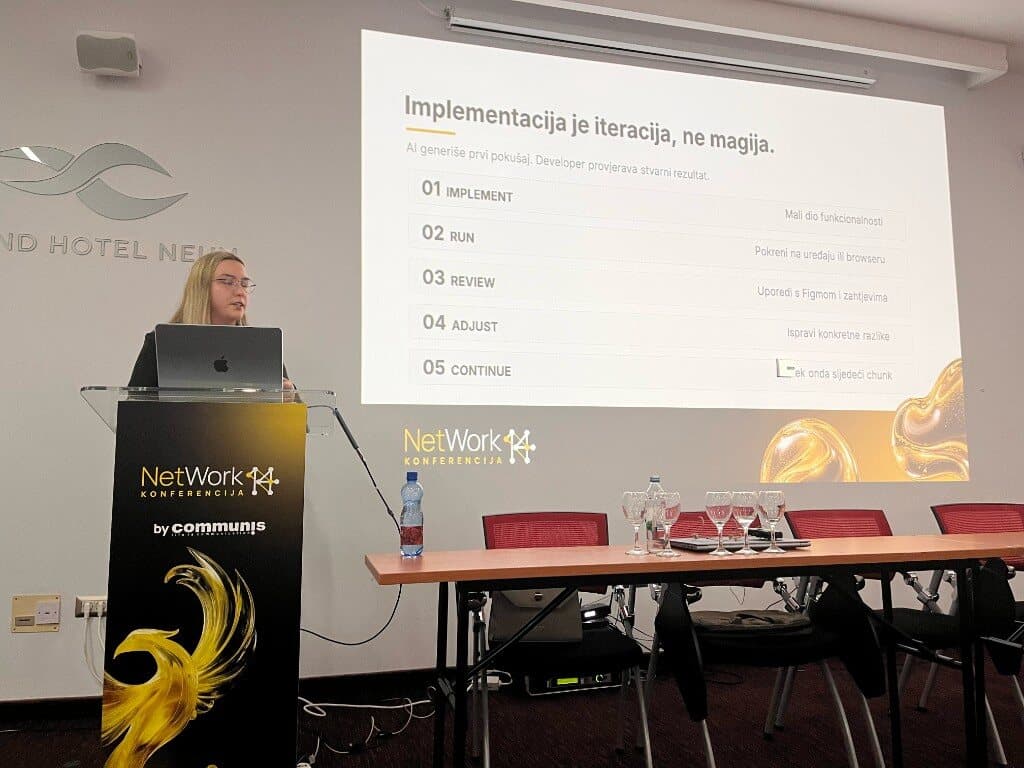
The demos people see online are one prompt and a finished app a few minutes later. That is not how I ship something a real person will use, on top of an existing system, with business rules and data. The loop on the slide is smaller than that, and closer to the work. AI generates the first attempt. I check the real result. Then:
- Implement a small slice. One screen, or the list of free slots, before the confirmation flow and everything around it. If an agent changes forty files at once, the review is the hard part. A smaller slice keeps the diff explainable.
- Run it. On a device, a simulator, or in the browser. A clean build is not a working flow. The screen can open while the confirm button does nothing, or the data can vanish on refresh, or the layout can collide on another size. The model saying it is finished is not the check.
- Review it against Figma and the requirements. Spacing, type, and whether existing components were reused. Also the behavior a static frame hides: a bad input, no network, an empty list, a double tap. If the design and the current behavior of the app disagree, I want that conflict reported. I do not want the model to decide, on its own, anything that touches security, customer data, or business rules.
- Adjust the specific difference. “This is wrong, fix it” leaves the model guessing. “The space between the title and the card does not match the design. Change only that space” can be checked. The more precise the problem, the easier it is to see whether it is actually gone.
- Continue only then. Doing the whole feature in one pass feels faster until a wrong assumption forces you to unwind it. I optimize for a result I can explain and verify, not for how fast the first generation finished.
I have a sentence for the trap. Generation time is not delivery time. A model can write hundreds of lines in a few minutes. Integration, tests, a security pass, the business rules, and a check on more than one device are still the job. If the next two hours are spent restoring something that used to work, nothing got faster. On a product people already use, I write the boundary down: which files may change, which behavior must stay, which components to reuse, which tests to run.
Then ask how it breaks
After a booking flow works on the happy path, I change the question. I stop asking the model to build the feature. I ask how the feature can stop working. Two people reserving the same slot. A double tap that sends two requests. A timeout where the server saved the booking and the phone never heard back. A 500 from the backend. A button you disable after the first tap is not enough for the double tap. The server has to recognize a repeated request when the same operation must not run twice. Two people booking at once is a concurrency problem in the backend or the database, not a loading spinner. The point is not to have the model congratulate its own code. The point is to look for where it fails.
I was careful with the numbers. An example of hours saved that I put on a slide, I labeled as an illustration, not a measurement of my own projects. I am leaving that illustration out. The method is the part worth keeping.
Five rules I actually use
- Context before the prompt. “Build me an app” leaves the model to fill every gap, and it will fill them with something you did not mean. Name what you are building, who it is for, which problem it solves, and which limits you already know. The model can help you find the gaps. You still confirm the answers.
- A decision before generation. Ask for options and tradeoffs. A faster build can be expensive to maintain. A design that scales can be pointless for a product that is still finding its first users. You pick, against the real constraints.
- Analysis before code. On an existing project, the first instruction is not to write code yet. Existing components, navigation, where data lives, how services are organized, and what must not change. Otherwise the time you saved generating code comes back as time spent repairing what used to work.
- Limits before autonomy. An agent that can read the repo, edit many files, and run commands needs a precise statement of what it may touch, including keys and customer data. One screen does not require a new navigation system. A design pass does not require a backend rewrite. Autonomy without a fence is a faster way to make a larger mess.
- Test and review before production. Passing tests are not the same as a feature that is correct, safe, and ready for a real person. People use the product, not the prompt. They do not care whether a developer or a model typed the function. They care that it works, that their data is safe, and that they can rely on it.
AI can already help define requirements, propose an architecture, draft a design, write code, generate tests, find bugs, refactor, and document. It can be a strong collaborator, an analyst, a sparring partner on architecture, and another pair of eyes while you test. It cannot take the responsibility. The aim is not to let the model think instead of us. It is to spend more of the day on the decisions that still require a person. The line I closed with: AI can write the code. We stand behind the product.
The standard we work to
That is the standard I described, and it is the one we work to at CodeLoop in Sarajevo. If you want a named person on a product, and AI used where it shortens the work and reviewed where it can do harm, the short version of the team is on the team page. Putting AI inside a product — credits, privacy, what leaves the phone — is a different job from using AI to build, and it lives on the AI page. The way we use the tools in the editor is written up separately, in the note on vibe coding.